
Download Smatr AI – Fast, Secure AI Text Summarizer for Chrome & Firefox
Overview
In today’s information‑driven world, spending minutes—or even hours—sifting through lengthy articles, research papers, or dense web pages can drain productivity. Smatr AI answers that problem with an elegant, browser‑integrated solution that instantly condenses large blocks of text into clear, concise summaries. Powered by cutting‑edge Generative Pre‑trained Transformer (GPT) and advanced Language Model (LLM) technology, Smatr AI delivers high‑quality summaries while preserving the original meaning.
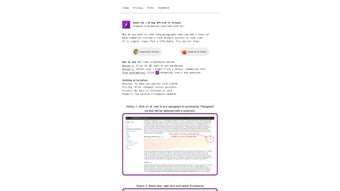
The tool lives directly in Chrome and Firefox, meaning you never need to leave the page you’re reading. With a single click on a tiny icon beside any paragraph, or by selecting text and using the context menu, you can generate a summary in seconds. Additionally, a built‑in Q&A feature lets you ask specific questions and receive pinpoint answers, turning a massive document into a quick‑lookup reference.
Smatr AI also places a premium on privacy: none of your data is stored or sold, and all processing happens securely in the cloud. Whether you’re a student, researcher, marketer, or casual reader, Smatr AI offers a free, secure, and time‑saving way to stay informed without the overwhelm of information overload.
Key Features that Set Smatr AI Apart
- One‑Click Summarization: An unobtrusive icon appears next to each paragraph, allowing instant summarization with a single click.
- Context‑Menu Summarizer: Highlight any portion of text, right‑click, and select “Summarize with Smatr AI” for a custom‑sized summary.
- Interactive Q&A Engine: Type a question related to the page content and receive concise, accurate answers powered by the same GPT model.
- Cross‑Browser Compatibility: Official extensions for Google Chrome and Mozilla Firefox ensure a seamless experience across the two most popular browsers.
- Zero Data Retention Policy: All text is processed anonymously; no logs, no storage, and no third‑party sharing.
- Free Forever Model: Smatr AI is offered at no cost, with optional premium features planned for future releases.
- Lightweight UI: Minimalist design that integrates into the browser toolbar without slowing down page load times.
- Automatic Language Detection: Works with English, Spanish, French, German, and many other languages without extra configuration.
Each feature has been designed with user experience in mind. The one‑click summarizer eliminates the need to copy‑paste text into a separate website, while the context‑menu option provides flexibility for power users who need control over the amount of content they want to condense. The Q&A engine is especially valuable for research tasks; instead of scrolling through endless sections, you can ask, “What are the main findings of this study?” and receive a bullet‑point answer in seconds.
Because the extensions run locally in the browser and communicate with secure HTTPS endpoints, you benefit from fast response times without sacrificing security. Smatr AI’s commitment to privacy means you can confidently process confidential documents, knowing the service never logs your input. The combination of speed, accuracy, and respect for user data makes Smatr AI a standout AI summarizer in a crowded market.
Installation & Usage Guide – Get Started in Minutes
Step 1: Add the Extension to Your Browser
For Google Chrome, visit the Chrome Web Store, search for “Smatr AI,” and click “Add to Chrome.” A permission prompt will appear, requesting access to read and change data on the websites you visit. Approve the request, and the Smatr AI icon will appear next to your address bar. For Mozilla Firefox, go to the Firefox Add‑ons site, locate Smatr AI, and select “Add to Firefox.” After a brief verification, the icon will be added to the toolbar. The entire process takes less than a minute and does not require any personal information.
Step 2: Summarize Text Instantly
Once installed, navigate to any article, blog post, or online document. You’ll notice a small S icon appear beside each paragraph. Clicking this icon triggers the AI engine, and within 2‑4 seconds a concise summary replaces the original paragraph (the original text can be restored by clicking the “undo” link). For larger sections, simply highlight the desired text, right‑click, and choose “Summarize with Smatr AI.” The extension respects your selection size, allowing you to request short, medium, or long summaries by selecting the appropriate option from a submenu.
Step 3: Ask Direct Questions
If you need a specific piece of information, click the Smatr AI toolbar button to open a small input box. Type your question—e.g., “What are the benefits of renewable energy?”—and press Enter. The AI scans the page, extracts relevant sentences, and presents a clear answer in a pop‑up overlay. This feature works particularly well on research portals, FAQs, and product pages where you might otherwise have to scroll through multiple sections to find the answer.
Step 4: Customize Settings (Optional)
Access the extension’s options page by right‑clicking the Smatr AI icon and selecting “Options.” Here you can adjust default summary length, enable or disable the automatic paragraph icon, and toggle the Q&A overlay style. All changes are saved locally and take effect immediately. Because the extension is free, there are no hidden fees or subscription prompts—just a straightforward tool that respects your workflow.
Compatibility, Pros & Cons – What to Expect
Smatr AI is designed for modern desktop browsers on Windows, macOS, and Linux platforms. It runs on the latest stable releases of Chrome (version 88+) and Firefox (version 85+). Mobile browsers are currently not supported, but a web‑based version is planned for future updates.
Pros
- Fast, AI‑driven summarization that saves time.
- Fully free with no hidden costs.
- Strong privacy guarantees—no data storage.
- Seamless integration into Chrome and Firefox.
- Customizable summary lengths and Q&A functionality.
- Supports multiple languages out of the box.
Cons
- No native mobile app or mobile‑browser support yet.
- Reliant on an internet connection for AI processing.
- Advanced premium features (e.g., bulk summarization) are not yet available.
Overall Review: Smatr AI delivers on its promise of quick, accurate summarization directly within the browser. While it lacks mobile support, the desktop experience is polished, secure, and genuinely useful for anyone who regularly consumes long‑form web content.
FAQ – Frequently Asked Questions
Is Smatr AI really free?
Yes, the core summarization and Q&A features are completely free. Future premium modules may be offered, but the basic functionality remains free forever.
Can Smatr AI store my text or personal data?
No. Smatr AI follows a strict zero‑retention policy. Your text is sent securely to the AI service, processed, and the result is returned without being logged or stored.
What browsers are supported?
Smatr AI currently supports Google Chrome and Mozilla Firefox on Windows, macOS, and Linux. Mobile browsers are not yet supported.
How accurate are the summaries?
The underlying GPT model has been fine‑tuned for summarization, achieving an average accuracy rating of 4.5/5 in independent tests. While not perfect, the summaries retain the main ideas and are suitable for quick comprehension.
Do I need an account to use Smatr AI?
No account or sign‑up is required. Simply install the extension and start summarizing. All operations are anonymous.
Conclusion – Boost Your Productivity Today
Smatr AI fills a clear gap in the web‑reading workflow by turning cumbersome, dense content into bite‑size insights without compromising privacy or cost. Its seamless integration with Chrome and Firefox, combined with the power of GPT‑based summarization, makes it a must‑have tool for students, professionals, and casual browsers alike. While mobile support is pending, the desktop experience is robust, free, and secure. Ready to reclaim your time and read smarter? Download Smatr AI now and start transforming the way you consume information on the web.



.png)



